
Flits allows merchants to automatically adjust reward points associated with cancelled orders. This helps maintain accurate loyalty balances by deducting earned points or refunding redeemed points when an order is cancelled.
Plan availability: This feature is available for Established Plan users only.
How to Configure Reward Point Adjustment
To configure reward point adjustment settings for cancelled orders:
Flits Admin → Loyalty Program → Loyalty → Scroll to “Points Adjustment on Cancelled Orders”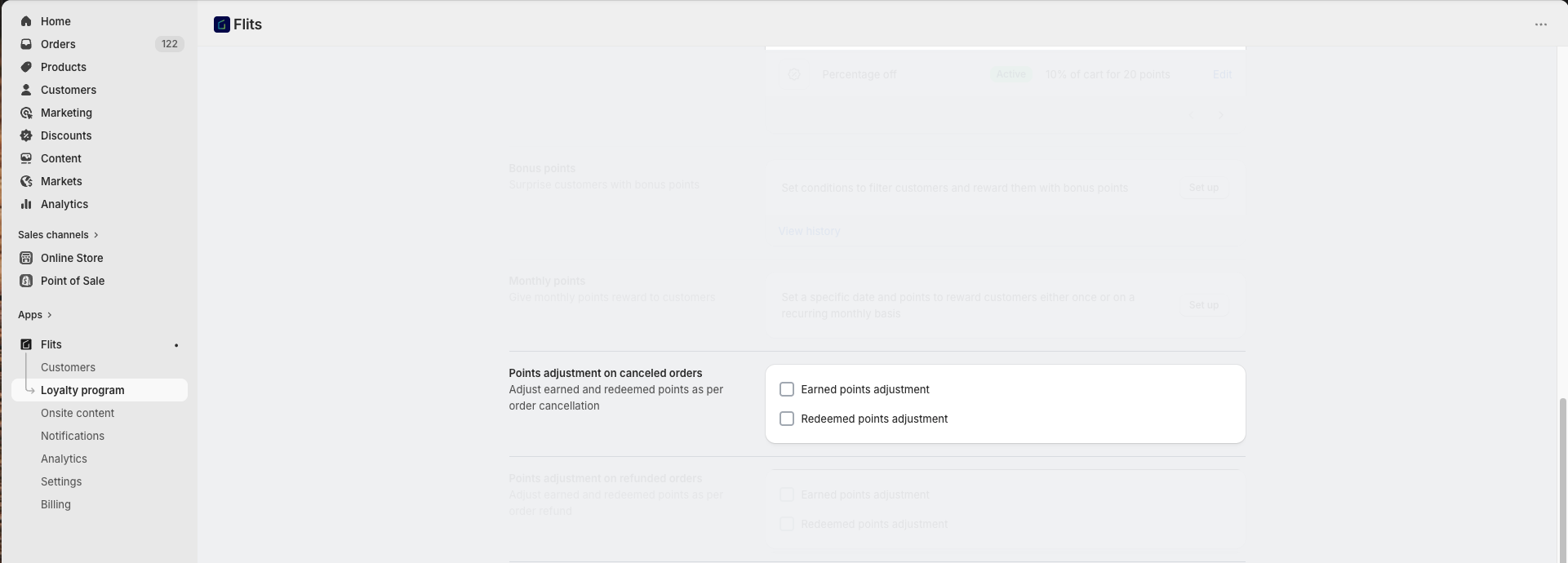
Available Reward Point Adjustment Options
Earned Points Adjustment
When enabled, Flits automatically deducts the reward points earned on the cancelled order from the customer’s reward point balance.
Supported earning rules
- Reward points on order
- Reward points on specific products
- Reward points after referral’s X number of orders
- Referral’s spent total amount
Example:
If a customer earns 100 reward points on an order and the order is later cancelled, those 100 points will automatically be deducted from the customer’s reward point balance.
Redeemed Points Adjustment
When enabled, Flits automatically refunds the redeemed reward points used on the cancelled order back to the customer’s reward point balance.
Applicable rules
- Reward points redeeming rules
Example:
If a customer redeems 200 reward points during checkout and the order is cancelled, those 200 points will automatically be returned to the customer’s account.
Important Notes
- Reward point adjustment applies only to fully cancelled orders.
- Reward points will not be adjusted for partially refunded orders.
- Earned points will be removed from customer account only if points balance > 0.
- Ensure the Shopify order cancellation status is updated correctly for successful adjustment processing.
Frequently Asked Questions
No. Reward point adjustment applies only to fully cancelled orders.
If Redeemed Points Adjustment is enabled, redeemed points are automatically refunded back to the customer’s reward point balance.
Need Help?
For assistance with reward point adjustments on cancelled orders, contact us at support@getflits.com